Solving Captchas
Our API is based on HTTP requests and supports both HTTP and HTTPS protocols.
API endpoints:
https://api.tickcaptcha.com/create is used to submit a captchahttps://api.tickcaptcha.com/result is used to get the captcha solution
The process of solving captchas with tenet is really easy and it's mostly the same for all types of captchas:
- Get your API key from your API key. Each user is given a unique authentication token, we call it API key. It's a 32-characters string that looks like:
347bc2896fc1812d3de5ab56a0bf4ea7
This key will be used for all your requests to our server.
- Submit a HTTP POST request to our API URL:
https://api.tickcaptcha.com/create with parameters corresponding to the type of your captcha.
Server will return captcha ID or an error code if
something went wrong.
- Make a timeout: 20 seconds for reCAPTCHA, 5 seconds for other types of captchas.
- Submit a HTTP GET request to our API URL:
https://api.tickcaptcha.com/result to get the result.
If captcha is already solved server will return the answer in format corresponding to the type of your captcha.
By default answers are returned as plain text like: OK|Your answer. But answer can also be returned as JSON {"status":1,"request":"TEXT"} if json parameter is used.
If captcha is not solved yet server will return CAPCHA_NOT_READY result. Repeat your request in 5 seconds.
If something went wrong server will return an error code.
Normal Captcha
Normal Captcha is an image that contains distored but human-readable text. To solve the captcha user have to type the text from the image.
To solve the captcha with our service you have to submit the image with HTTP POST
request to our API URL: https://api.tickcaptcha.com/create
Server accepts images in multipart or base64 format.
Multipart sample form
<form action="https://api.tickcaptcha.com/create" enctype="multipart/form-data" method="post">
  <input name="method" type="hidden" value="post"/>
  Your key:
  <input name="key" type="text" value="YOUR_APIKEY"/>
  The CAPTCHA file:
  <input name="file" type="file"/>
  <input type="submit" value="Upload and get the ID"/>
</form>
YOUR_APIKEY is Your API key.
Base64 sample form
<form action="https://api.tickcaptcha.com/create" method="post">
  <input name="method" type="hidden" value="base64"/>
  Your key:
  <input name="key" type="text" value="YOUR_APIKEY"/>
  The CAPTCHA file body in base64 format:
    <textarea name="body">BASE64_FILE</textarea>
    <input type="submit" value="Upload and get the ID"/>
</form>
YOUR_APIKEY is here your API key.
BASE64_FILE is base64-encoded image body.
You can provide additional parameters with your request to define what kind of captcha you'resending and to help OCR servers to solve your captcha correctly. You can find the full list of parameters in the table below.
If everything is fine server will return the ID of your captcha as plain text, like:OK|123456789 or as JSON {"status":1,"request":"123456789"} if json parameter was used.
If something went wrong server will return an error. See Error Handling chapter for the list of errors.
Make a 5 seconds timeout and submit a HTTP GET request to our API URL: https://api.tickcaptcha.com/result providing the captcha ID. The list of parameters is in the table below.
If everything is fine and your captcha is solved server will return the answer as plain text, like: OK|TEXT or as JSON {"status":1,"request":"TEXT"} if json parameter was used.
Otherwise server will return CAPCHA_NOT_READY that means that your captcha is not solved yet. Just repeat your request in 5 seconds.
If something went wrong server will return an error. See Error Handling chapter for the list of errors.
List of POST request parameters for https://api.tickcaptcha.com/create
| POST parameter |
Type |
Required |
Description |
| key |
String |
Yes |
your API key |
| method |
String |
Yes |
post - defines that you're sending an image with multipart form
base64 - defines that you're sending a base64 encoded image |
| file |
File |
Yes* |
Captcha image file.
* - required if you submit image as a file (method=post)
|
| body |
String |
Yes* |
Base64-encoded captcha image
* - required if you submit image as Base64-encoded string (method=base64)
|
| module |
String |
No |
NEW Choose from custom image modules for perfect results.
List of available modules:
- common-1
- common-2
- common-3
- collection-1
- collection-2
- collection-3
- collection-4
- collection-5
- ...
Full list of custom image modules [authentication required]
|
| phrase |
Integer
Default: 0 |
No |
0 - captcha contains one word
1 - captcha contains two or more words |
| regsense |
Integer
Default: 0 |
No |
0 - captcha in not case sensitive
1 - captcha is case sensitive |
| numeric |
Integer
Default: 0 |
No |
0 - not specified
1 - captcha contains only numbers
2 - captcha contains only letters
3 - captcha contains only numbers OR only letters
4 - captcha contains both numbers AND letters |
| calc |
Integer
Default: 0 |
No |
0 - not specified
1 - captcha requires calculation (e.g. type the result 4 + 8 = ) |
| min_len |
Integer
Default: 0 |
No |
0 - not specified
1..20 - minimal number of symbols in captcha |
| max_len |
Integer
Default: 0 |
No |
0 - not specified
1..20 - maximal number of symbols in captcha |
| language |
Integer
Default: 0 |
No |
0 - not specified
1 - Cyrillic captcha
2 - Latin captcha |
| lang |
String |
No |
Language code. See the list of supported languages. |
| json |
Integer
Default: 0 |
No |
0 - server will send the response as plain text
1 - tells the server to send the response as JSON |
List of GET request parameters for https://api.tickcaptcha.com/result
| GET parameter |
Type |
Required |
Description |
| key |
String |
Yes |
your API key |
| action |
String |
Yes |
get - get the asnwer for your captcha |
| id |
Integer |
Yes |
ID of captcha returned by create. |
| json |
Integer
Default: 0 |
No |
0 - server will send the response as plain text
1 - tells the server to send the response as JSON |
| header_acao |
Integer
Default: 0 |
No |
0 - disabled
1 - enabled.
If enabled result will include Access-Control-Allow-Origin:* header in the response.
Used for cross-domain AJAX requests in web applications.
|
Request URL example:
https://api.tickcaptcha.com/result?key=347bc2896fc1812d3de5ab56a0bf4ea7&action=get&id=123456789
reCAPTCHA V2
reCAPTCHA V2 also known as I'm not a robot reCAPTCHA is a very popular type of captcha that looks like this:
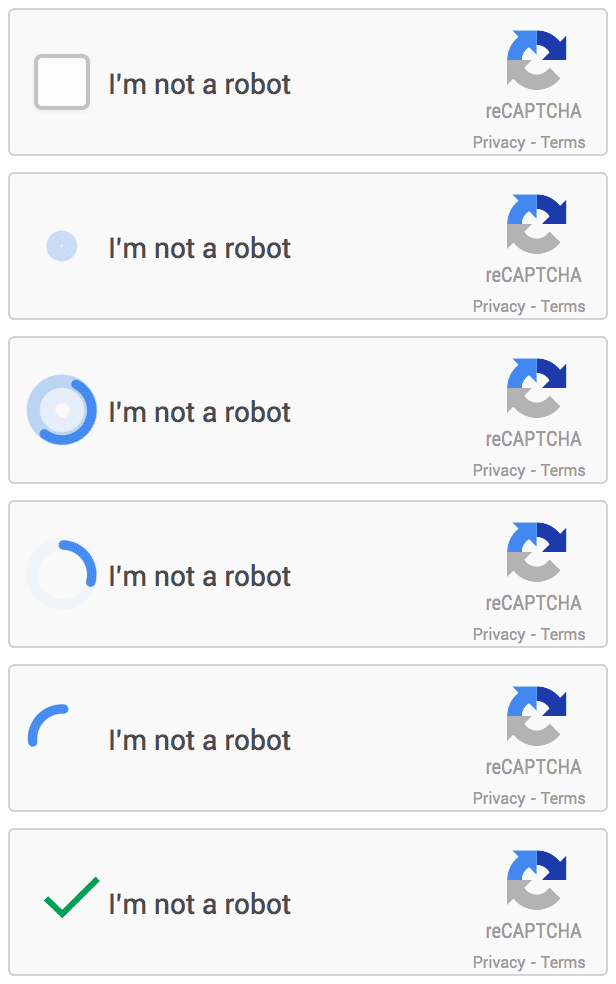
Solving reCAPTCHA V2 with our method is pretty simple:
-
Look at the element's code at the page where you found reCAPTCHA.
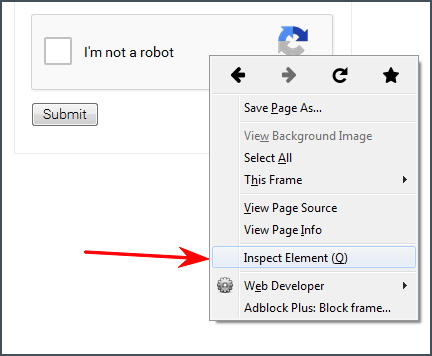
-
Find a link that begins with [www.google.com/recaptcha/api2/anchor](https://www.google.com/recaptcha/api2/anchor) or find data-sitekey parameter.
-
Copy the value of k parameter of the link (or value of data-sitekey parameter).
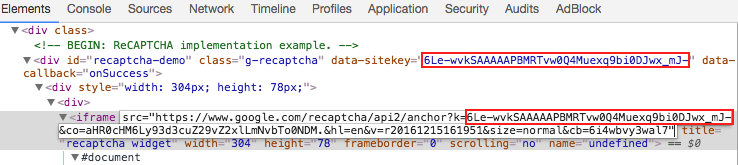
-
Submit a HTTP GET or POST request to our API URL: https://api.tickcaptcha.com/create with method set to userrecaptcha and the value found on previous step as value for googlekey and full page URL as value for pageurl. Sending proxies is not obligatory ar the moment but it's recommended.
You can find the full list of parameters in the table below.
Request URL example:
https://api.tickcaptcha.com/create?key=347bc2896fc1812d3de5ab56a0bf4ea7&method=userrecaptcha&googlekey=6Le-wvkSVVABCPBMRTvw0Q4Muexq1bi0DJwx_mJ-&pageurl=https://mysite.com/page/with/recaptcha
-
If everything is fine server will return the ID of your captcha as plain text, like:
OK|123456789 or as JSON {"status":1,"request":"123456789"} if
json parameter was used.
Otherwise server will return an error code.
-
Make a 15-20 seconds timeout then submit a HTTP GET request to our API URL:
https://api.tickcaptcha.com/result to get the result.
The full list of parameters is in the table below.
If captcha is already solved server will respond in plain text or JSON and return the
answer token that looks like:
03AHJ_Vuve5Asa4koK3KSMyUkCq0vUFCR5Im4CwB7PzO3dCxIo11i53epEraq-uBO5mVm2XRikL8iKOWr0aG50sCuej9bXx5qcviUGSm4iK4NC_Q88flavWhaTXSh0VxoihBwBjXxwXuJZ-WGN5Sy4dtUl2wbpMqAj8Zwup1vyCaQJWFvRjYGWJ_TQBKTXNB5CCOgncqLetmJ6B6Cos7qoQyaB8ZzBOTGf5KSP6e-K9niYs772f53Oof6aJeSUDNjiKG9gN3FTrdwKwdnAwEYX-F37sI_vLB1Zs8NQo0PObHYy0b0sf7WSLkzzcIgW9GR0FwcCCm1P8lB-50GQHPEBJUHNnhJyDzwRoRAkVzrf7UkV8wKCdTwrrWqiYDgbrzURfHc2ESsp020MicJTasSiXmNRgryt-gf50q5BMkiRH7osm4DoUgsjc_XyQiEmQmxl5sqZP7aKsaE-EM00x59XsPzD3m3YI6SRCFRUevSyumBd7KmXE8VuzIO9lgnnbka4-eZynZa6vbB9cO3QjLH0xSG3-egcplD1uLGh79wC34RF49Ui3eHwua4S9XHpH6YBe7gXzz6_mv-o-fxrOuphwfrtwvvi2FGfpTexWvxhqWICMFTTjFBCEGEgj7_IFWEKirXW2RTZCVF0Gid7EtIsoEeZkPbrcUISGmgtiJkJ_KojuKwImF0G0CsTlxYTOU2sPsd5o1JDt65wGniQR2IZufnPbbK76Yh_KI2DY4cUxMfcb2fAXcFMc9dcpHg6f9wBXhUtFYTu6pi5LhhGuhpkiGcv6vWYNxMrpWJW_pV7q8mPilwkAP-zw5MJxkgijl2wDMpM-UUQ_k37FVtf-ndbQAIPG7S469doZMmb5IZYgvcB4ojqCW3Vz6Q
If captcha is not solved yet server will return CAPCHA_NOT_READY result. Repeat your request in 5 seconds.
If something went wrong server will return an error code.
-
Locate the element with id g-recaptcha-response and make it visible deleting display:none parameter.

Please note: sometimes content on the page is generated dynamically and you will not see this element in html source.
In such cases you have to explore javascript code that generates the content. "Inspect" option in Google Chrome can help in that.
As an alternative you can just use javascript to set the value of g-recaptcha-response field:
document.getElementById("g-recaptcha-response").innerHTML="TOKEN_FROM_TENET";
-
An input field will appear on the page. And you just have to paste the answer token to that field and submit the form.
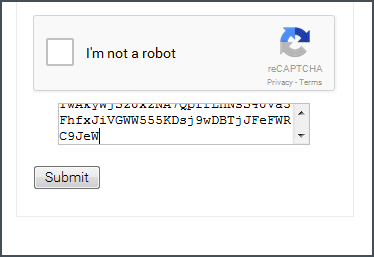
-
Congratulations, you've passed the recaptcha
reCAPTCHA Callback
Sometimes there's no submit button and a callback function is used isntead. The function is when reCAPTCHA is solved.
Callback function is usually defined in data-callback parameter of reCAPTCHA, for example:
data-callback="myCallbackFunction"
Or sometimes it's defined as callback parameter of grecaptcha.render function, for example:
grecaptcha.render('example', {'sitekey' : 'someSitekey','callback' : myCallbackFunction,'theme' : 'dark'});
Also there's another way to find the callback function - open javascript console of your browser and explore reCAPTCHA configuration object:
___grecaptcha_cfg.clients[0].aa.l.callback
Note that aa.l may change and there can be multiple clients so you have to check clients[1], clients[2] too.
Finally all you have to do is to call that function:
myCallbackFunction();
Or even this way:
___grecaptcha_cfg.clients[0].aa.l.callback();
Sometimes it is required to provide an argument and in most cases you should put the token there. For example:
myCallbackFunction('TOKEN');
Invisible reCAPTCHA V2
reCAPTCHA V2 also has an invisible version.
You may check how it looks like here: https://www.google.com/recaptcha/api2/demo?invisible=true
We added parameter invisible=1 that should be used for invisible reCAPTCHA.
Invisible reCAPTCHA is located on a DIV layer positioned -10 000 px from top that makes it invisible for user.
reCAPTCHA is activated on page load or on user's actions like click somewhere or submit a form - that depends on the website. If user's cookies are good enough then he will just pass it utomatically and no additional actions will be required. Otherwise user will see standard eCAPTCHA form with a challenge.
In most cases when challenge is completed a callback function is executed. You can read more about callback here.
If you are still not sure — there are few ways to determine that reCAPTCHA is in invisible mode:
- You don't see "I'm not a robot" checkbox on the page but getting recaptcha challenge making some actions there
- reCAPTCHA's iframe link contains parameter
size=invisible
- reCAPTCHA's configuration object contains parameter size that is set to invisible, for example
___grecaptcha_cfg.clients[0].aa.l.size is equal to invisible
How to bypass invisible reCAPTCHA in browser?
Method 1: using javascript:
- Change the value of g-recaptcha-response element to the token you received from our server:
document.getElementById("g-recaptcha-response").innerHTML="TOKEN_FROM_TENET";
-
Execute the action that needs to be performed on the page after solving reCAPTCHA.
Usually there's a form that should be submitted and you need to identify the form by id or name or any other attribute and then submit the form. Here are few examples:
document.getElementById("recaptcha-demo-form").submit(); //by id "recaptcha-demo-form"
document.getElementsByName("myFormName")[0].submit(); //by element name "myFormName"
document.getElementsByClassName("example").submit(); //by class name "example"
Or sometimes there's a callback function executed when reCAPTCHA is solved.
Callback function is usually defined in data-callback parameter of reCAPTCHA, for example:
data-callback="myCallbackFunction"
Or sometimes it's defined as callback parameter of
grecaptcha.render function, for example:
grecaptcha.render('example', {
  'sitekey' : 'someSitekey',
  'callback' : myCallbackFunction,
  'theme' : 'dark'
});
And all you have to do is to call that function:
myCallbackFunction();
- Voila! You've done that with just 2 strings of code.
Method 2: changing HTML:
- Cut the div containing reCAPTCHA from page body.
<div style="visibility: hidden; position: absolute; width:100%; top: -10000px; left: 0px; right: 0px; transition: visibility 0s linear 0.3s, opacity 0.3s linear; opacity: 0;">
<div style="width: 100%; height: 100%; position: fixed; top: 0px; left: 0px; z-index: 2000000000; background-color: #fff; opacity: 0.5;  filter: alpha(opacity=50)">
</div>
<div style="margin: 0 auto; top: 0px; left: 0px; right: 0px; position: absolute; border: 1px solid #ccc; z-index: 2000000000; background-color: #fff; overflow: hidden;">
<iframe frameborder="0" name="zglq3yifgkmj" scrolling="no" src="https://www.google.com/recaptcha/api2/bframe?hl=en&amp;v=r20170213115309&amp;k=6LfP0CITAAAAAHq9FOgCo7v_fb0-pmmH9VW3ziFs#zglq3yifgkmj" style="width: 100%; height: 100%;" title="recaptcha challenge"></iframe>
</div>
</div>
- Cut the whole block:
<div>
<div class="g-recaptcha" data-bind="recaptcha-demo-submit" data-callback="onSuccess" data-sitekey="6LfP0CITAAAAAHq9FOgCo7v_fb0-pmmH9VW3ziFs" id="recaptcha-demo"><div class="grecaptcha-badge" style="width: 256px; height: 60px; transition: right 0.3s ease 0s; position: fixed; bottom: 14px; right: -186px; box-shadow: 0px 0px 5px gray;"><div class="grecaptcha-logo"><iframe frameborder="0" height="60" name="undefined" scrolling="no" src="https://www.google.com/recaptcha/api2/anchor?k=6LfP0CITAAAAAHq9FOgCo7v_fb0-pmmH9VW3ziFs&amp;co=aHR0cHM6Ly93d3cuZ29vZ2xlLmNvbTo0NDM.&amp;hl=en&amp;v=r20170213115309&amp;size=invisible&amp;cb=uror1hlow5a" title="recaptcha widget" width="256"></iframe></div><div class="grecaptcha-error"></div><textarea class="g-recaptcha-response" id="g-recaptcha-response" name="g-recaptcha-response" style="width: 250px; height: 40px; border: 1px solid #c1c1c1; margin: 10px 25px; padding: 0px; resize: none;  display: none; "></textarea></div></div>
<script>
    var onSuccess = function (response) {
        var errorDivs = document.getElementsByClassName("recaptcha-error");
        if (errorDivs.length) {
            errorDivs[0].className = "";
        }
        var errorMsgs = document.getElementsByClassName("recaptcha-error-message");
        if (errorMsgs.length) {
            errorMsgs[0].parentNode.removeChild(errorMsgs[0]);
        }
        document.getElementById("recaptcha-demo-form").submit();
    };
</script></div>
- Put the following code instead of the block you've just cut:
<input type="submit"/>
<textarea name="g-recaptcha-response">%g-recaptcha-response%</textarea>
Where %g-recaptcha-response% - is an answer token you’ve got from our service.
- You will see “Submit query” button.
Press the button to submit the form with g-recaptcha-response and all other form
data to the website.
List of GET/POST request parameters for https://api.tickcaptcha.com/create
| Parameter |
Type |
Required |
Description |
| key |
String |
Yes |
your API key |
| method |
String |
Yes |
userrecaptcha - defines that you're sending a reCAPTCHA V2 with new method
|
| googlekey |
String |
Yes |
Value of k or data-sitekey parameter you found on page
|
| pageurl |
String |
Yes |
Full URL of the page where you see the reCAPTCHA |
| domain |
String
Default: google.com |
No |
Domain used to load the captcha: google.com or recaptcha.net |
| invisible |
Integer
Default: 0 |
No |
1 - means that reCAPTCHA is invisible. 0 - normal reCAPTCHA. |
| data-s |
String |
No |
Value of data-s parameter you found on page. Curenttly applicable for Google Search and other Google services.
|
| cookies |
String |
No |
Your cookies that will be passed to our OCR server who solve the captha. We also return OCR server's cookies in the response if you use json=1.
Format: KEY:Value, separator: semicolon, example: KEY1:Value1;KEY2:Value2;
|
| userAgent |
String |
No |
Your userAgent that will be passed to our OCR server and used to solve the captcha.
|
| header_acao |
Integer
Default: 0 |
No |
0 - disabled
1 - enabled.
If enabled create will include Access-Control-Allow-Origin:* header in the response.
Used for cross-domain AJAX requests in web applications. Also supported by result.
|
| json |
Integer
Default: 0 |
No |
0 - server will send the response as plain text
1 - tells the server to send the response as JSON |
| proxy |
String |
No |
Format: login:email.com:3128
You can find more info about proxies here. |
| proxytype |
String |
No |
Type of your proxy: HTTP, HTTPS, SOCKS4, SOCKS5. |
List of GET request parameters for https://api.tickcaptcha.com/result
| GET parameter |
Type |
Required |
Description |
| key |
String |
Yes |
your API key |
| action |
String |
Yes |
get - get the asnwer for your captcha |
| id |
Integer |
Yes |
ID of captcha returned by create |
| json |
Integer
Default: 0 |
No |
0 - server will send the response as plain text
1 - tells the server to send the response as JSON |
Request URL example:
https://api.tickcaptcha.com/result?key=347bc2896fc1812d3de5ab56a0bf4ea7&action=get&id=123456789
reCAPTCHA V3
reCAPTCHA V3 is the newest type of captcha from Google. It has no challenge so there is no need for user interaction. Instead it uses a "humanity" rating - score.
reCAPTCHA V3 technically is quite similar to reCAPTCHA V2: customer receives a token from
reCAPTCHA API which is then sent inside a POST request to the target website and
verified via reCAPTCHA API.
The difference is now reCAPTCHA API returns rating of a user detecting whether he was a real human or a bot. This rating is called score and could be a number from 0.1 to 0.9. his score is passed to the website which then decides what to do with the user request.
Also there is a new parameter action allowing to process user actions on the website differently. After the verification of token reCAPTCHA API returns the name of the action user performed.
How to solve reCAPTCHA V3 using tenet:
-
First you've got to be sure the target website is actually using reCAPTCHA V3
There should be V3 if:
- there is no captcha and no images to click on
- api.js script is loading with the render=sitekey parameter, for example:
https://www.google.com/recaptcha/api.js?render=6LfZil0UAAAAAAdm1Dpzsw9q0F11-bmervx9g5fE
- clients array of ___grecaptcha_cfg object is using index 100000: ___grecaptcha_cfg.clients[100000]
-
To start solving reCAPTCHA V3 using our API first you've got to find three
parameters:
sitekey - this parameter could be obtained from the URI of
api.js as a value of render parameter. It could also be found inside
URI of iframe with reCAPTCHA, in javascript code of the website where it's
calling grecaptcha.execute function or in ___grecaptcha_cfg configuration
object.
action - you've got to find this inspecting javascript code of the website looking for call of grecaptcha.execute function. Example:
grecaptcha.execute('6LfZil0UAAAAAAdm1Dpzsw9q0F11-bmervx9g5fE', {action:
do_something}).
Sometimes it's really hard to find it and you've got to dig through all js-files loaded by website. You may also try to find the value of action parameter inside___grecaptcha_cfg configuration object but usually it's undefined. In that case you have to call grecaptcha.execute and inspect javascript code. If you can't find it try to use the default value "verify" - our API will use it if you don't provide action in your request.
pageurl - full URL of the page where you see the reCAPTCHA V3.
Now you need to understand the score you need to solve V3. You can't
predict what score is acceptable for the website you want to solve at. It can
only be figured out by trial and error. The lowest score is 0.1 which means
"robot", the highest is 0.9 which means "human". But most sites uses thresholds
from 0.2 to 0.5 because real humans receive a low score oftenly. Our service is
able to provide solutions which requires the score of 0.3. Higher score is
extreamly rare.
-
Having all necessary parameters stated above you may send request to our API.
-
Submit a HTTP GET or POST request to our API URL:
https://api.tickcaptcha.com/create
with method set to
userrecaptcha and version set to v3 along with
min_score set to score website requires, sitekey inside
googlekey parameter and full page URL as value for pageurl.
You have to include action parameter to or else we will use default
value verify.
List of request parameters below.
URL request sample:
https://api.tickcaptcha.com/create?key=347bc2896fc1812d3de5ab56a0bf4ea7&method=userrecaptcha&version=v3&action=verify&min_score=0.3&googlekey=6LfZil0UAAAAAAdm1Dpzsw9q0F11-bmervx9g5fE&pageurl=https://mysite.com/page/
-
If everything is fine server will return the ID of your captcha as plain text,like: OK|123456789 or as JSON
{"status":1,"request":"123456789"} if json parameter was used.
If something went wrong server will return an error. See Error Handling chapter for the list of errors.
-
Make a 10-15 seconds timeout and submit a HTTP GET request to our API
https://api.tickcaptcha.com/result providing the captcha ID. The list of parameters is in the table below.
If everything is fine and your captcha is solved server will return the answer as plain text or as JSON. The answer is a token like this:
03AHJ_Vuve5Asa4koK3KSMyUkCq0vUFCR5Im4CwB7PzO3dCxIo11i53epEraq-uBO5mVm2XRikL8iKOWr0aG50sCuej9bXx5qcviUGSm4iK4NC_Q88flavWhaTXSh0VxoihBwBjXxwXuJZ-WGN5Sy4dtUl2wbpMqAj8Zwup1vyCaQJWFvRjYGWJ_TQBKTXNB5CCOgncqLetmJ6B6Cos7qoQyaB8ZzBOTGf5KSP6e-K9niYs772f53Oof6aJeSUDNjiKG9gN3FTrdwKwdnAwEYX-F37sI_vLB1Zs8NQo0PObHYy0b0sf7WSLkzzcIgW9GR0FwcCCm1P8lB--gf50q5BMkiRH7osm4DoUgsjc_XyQiEmQmxl5sqZP7aKsaE-EM00x59XsPzD3m3YI6SRCFRUevSyumBd7KmXE8VuzIO9lgnnbka4-eZynZa6vbB9cO3QjLH0xSG3--o-fxrOuphwfrtwvvi2FGfpTexWvxhqWICMFTTjFBCEGEgj7_IFWEKirXW2RTZCVF0Gid7EtIsoEeZkPbrcUISGmgtiJkJ_KojuKwImF0G0CsTlxYTOU2sPsd5o1JDt65wGniQR2IZufnPbbK76Yh_KI2DY4cUxMfcb2fAXcFMc9dcpHg6f9wBXhUtFYTu6pi5LhhGuhpkiGcv6vWYNxMrpWJW_pV7q8mPilwkAP-zw5MJxkgijl2wDMpM-UUQ_k37FVtf-ndbQAIPG7S469doZMmb5IZYgvcB4ojqCW3Vz6Q
If the captcha is not solved yet server will return CAPCHA_NOT_READY. Just repeat your request in 5 seconds.
If something went wrong server will return an error. See Error Handling chapter for the list of errors.
Sample request:
https://api.tickcaptcha.com/result?key=347bc2896fc1812d3de5ab56a0bf4ea7&action=get&json=1&id=123456789
-
After receiving the token from our API you've got to use it properly on the
target website. Best way to understant that is to check the requests sent to
site when you act as a normal user. Most browsers has developer's console tool
where you should check Network tab.
Usually token is sent using POST request. It could be g-recaptcha-response just like reCAPTCHA V2 does or g-recaptcha-response-100000. It could be other parameter too. So you'vegot to inspect the requests and find out how exactly the token supposed to be sent. Then you have to compose your request accordingly.
List of GET/POST request parameters for https://api.tickcaptcha.com/create
| Parameter |
Type |
Required |
Description |
| key |
String |
Yes |
your API key |
| method |
String |
Yes |
userrecaptcha — defines that you're sending a reCAPTCHA |
| version |
String |
Yes |
v3 — defines that you're sending a reCAPTCHA V3 |
| googlekey |
String |
Yes |
Value of sitekey parameter you found on page |
| pageurl |
String |
Yes |
Full URL of the page where you see the reCAPTCHA |
| domain |
String
Default: google.com |
No |
Domain used to load the captcha: google.com or recaptcha.net |
| action |
String
Default: verify |
No |
Value of action parameter you found on page |
| min_score |
Integer
Default: 0.4 |
No |
The score needed for resolution. Currently it's almost impossible to get
token with score higher than 0.3 |
| header_acao |
Integer
Default: 0 |
No |
0 — disabled
1 — enabled.
If enabled create will include Access-Control-Allow-Origin:* header in the
response.
Used for cross-domain AJAX requests in web applications. Also supported by
result.
|
| json |
Integer
Default: 0 |
No |
0 — server will send the response as plain text
1 — tells the server to send the response as JSON |
List of GET request parameters for https://api.tickcaptcha.com/result
| GET parameter |
Type |
Required |
Description |
| key |
String |
Yes |
your API key |
| action |
String |
Yes |
get — get the asnwer for your captcha
reportgood — report the asnwer was accepted
reportbad — report the asnwer was declined |
| id |
Integer |
Yes |
ID of captcha returned by create |
| json |
Integer
Default: 0 |
No |
0 — server will send the response as plain text
1 — tells the server to send the response as JSON |
| header_acao |
Integer
Default: 0 |
No |
0 — disabled
1 — enabled.
If enabled result will include Access-Control-Allow-Origin:* header in the response.
Used for cross-domain AJAX requests in web applications. |

